
Student research team · Toronto & Tehran
Computer vision for safer walking
We build computer vision that helps blind and low-vision people, and anyone walking with divided attention, get around safely.
01what we're building
From a street photo to a warning in time
Pedestrian safety, powered by computer vision. We focus on two groups: blind and low-vision (BLV) people, and pedestrians walking with divided attention, such as on their phones.

01 Collect
Obstacle-detection datasets
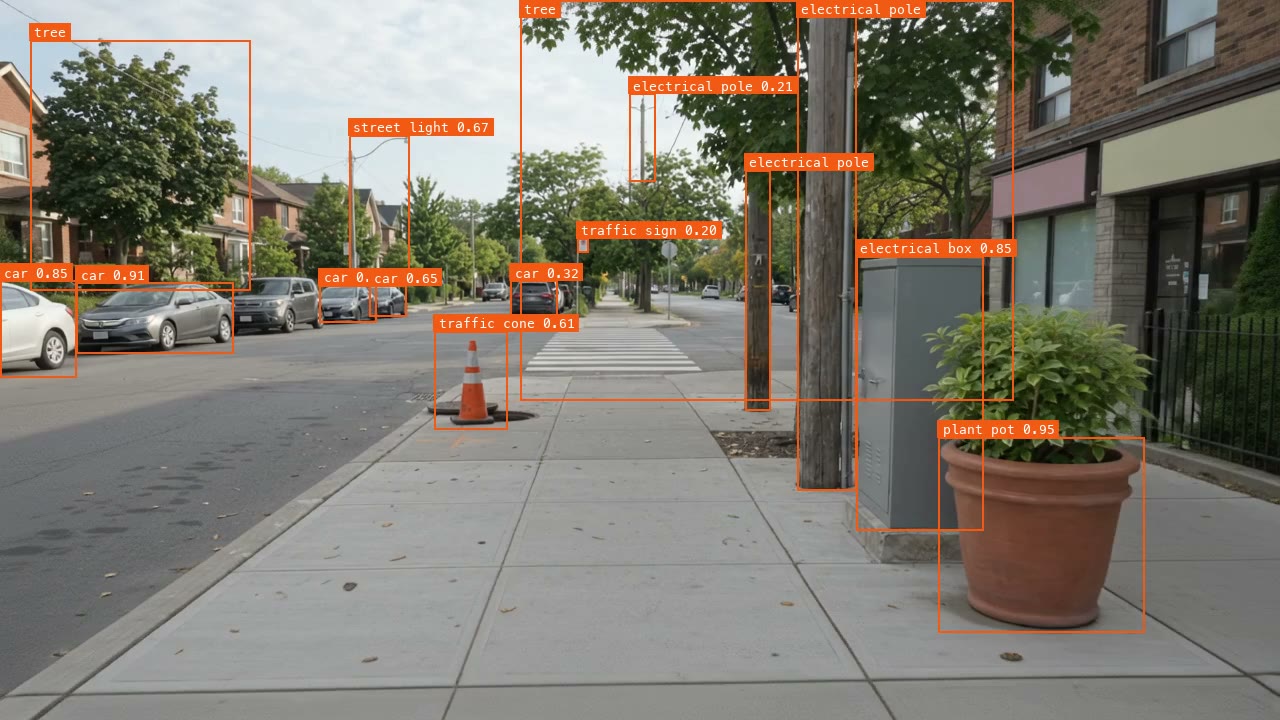
Eye-level images of real streets, labelled from a pedestrian’s point of view.
02 Detect
Real-time edge detectors
Compact models that spot obstacles fast enough to run on phones and wearables.
03 Guide
Assistive navigation
Turning detections into voice and haptic guidance that blind and low-vision people can rely on.
02the dataset
ROD-Dataset, open to everyone
24,326 eye-level street images with 40,195 human-verified boxes in 25 obstacle classes. Free under the MIT license, ready for any YOLO model.
Total downloads
105,683
Hugging FaceKaggle
- 24,326eye-level images
- 40,195verified boxes
- 25obstacle classes
- 1.53GB, YOLO format
- bike
- building
- car
- person
- stairs
- traffic sign
- electrical pole
- road
- motorcycle
- dustbin
- dog
- manhole
- tree
- guard rail
- pedestrian crosswalk
- truck
- bus
- bench
- traffic cone
- fire hydrant
- traffic barrel
- plant pot
- electrical box
- chair
- bicycle rack
03the android app
WalkSentry, in your pocket
Our detectors, packed into an Android app that watches the path ahead while you walk, and warns you by voice or vibration.
Runs on the phone
A YOLO detector in TensorFlow Lite reads the camera feed on-device, with no server and no upload.
Speaks for blind and low-vision users
Text-to-speech names the obstacle ahead, so the warning arrives without looking at the screen.
Buzzes for distracted walkers
A haptic pulse gets the attention of anyone looking down at their phone.
Fast enough to matter
Pruning and INT8 quantisation made on-device inference more than four times faster.
Kotlin · Jetpack Compose · TensorFlow Lite · YOLO
Coming soon toGoogle PlaySource code2
04open source
AnnotationFlow: photos in, dataset out
The local tool we use to grow our datasets. It cleans a folder of raw photos, labels them with a Roboflow Workflow, and exports a ready-to-train YOLO dataset.
- 01Raw imagesJPG, PNG, HEIC
- 02Normalisevalidate, convert
- 03De-duplicateexact matches
- 04InferenceRoboflow Workflow
- 05YOLO labelsnormalised xywh
- 06Split & exporttrain / valid / test
✓ dataset.zip ready to train
- dataset/
- train/70%
- images/ labels/
- valid/15%
- images/ labels/
- test/15%
- images/ labels/
- data.yaml
labels/IMG_0789.txtclass x y w h0 0.512 0.633 0.210 0.184
05publications
What we’ve published
Papers on our datasets, our on-device detectors, and the wider field of assistive navigation.
People

Hamed Farbeh
Principal Investigator

Abtin Zandi
Team Lead

Sarvin Nami
Member
Arian Ashrafi
Member
Our stack
The tools we use to build datasets, train detectors and run them on phones.
See WalkSentry in action
Our app and demos show how our detectors help people get around safely.
Go to App & Demo